RQL in VS Code
The Bifrost VS Code extension recognizes .rql files as Bifrost RQL and
.rqlp files as Bifrost RQL Policy. RQL, the
Rune Query Language, is Bifrost’s S-expression
language for structural query_code searches.
What Needs the Server
Section titled “What Needs the Server”| Feature | Needs a running server |
|---|---|
Language association, syntax highlighting, and file icons for .rql, .rqlp, and .rune | No |
Diagnostics for the current .rql or .rqlp text, updated 300 ms after you stop typing | Yes |
Hover for .rql and .rqlp | Yes |
Format Document for .rql and saved .rune files | Yes |
| Run a query with the Play button | Yes |
| Run a policy with the Play button | Yes |
| Suppress finding… | Yes |
| Bifrost: Show Rune IR | Yes |
Opening a query file does not start the server or wait for indexing. Start the server, wait until indexing finishes, and then run the query. If the server is not ready, the extension shows a warning and does not run anything.
Write queries in RQL text. The extension does not run JSON query files. To get
the canonical JSON form of a query, use the REPL :json command.
Run a Query
Section titled “Run a Query”Open a .rql file and click the Play button in the editor title. The extension
sends the current editor text, including unsaved edits, to the server.
For example, this query finds the main function in src/bin/bifrost.rs:
(result-detail full (where "src/bin/bifrost.rs" (function :name "main")))Results appear in the Bifrost Query Results view in the Explorer. If a normal query returns nothing, the extension says so in a notification.
For (explain QUERY) and (profile QUERY), the extension writes the report to
Output > Bifrost. A profile report includes the complete JSON telemetry.
The profiled query’s ordinary results also appear in the results view. Explain
mode only plans the query, so it shows no “no results” message. See
Explain and Profile CodeQuery.
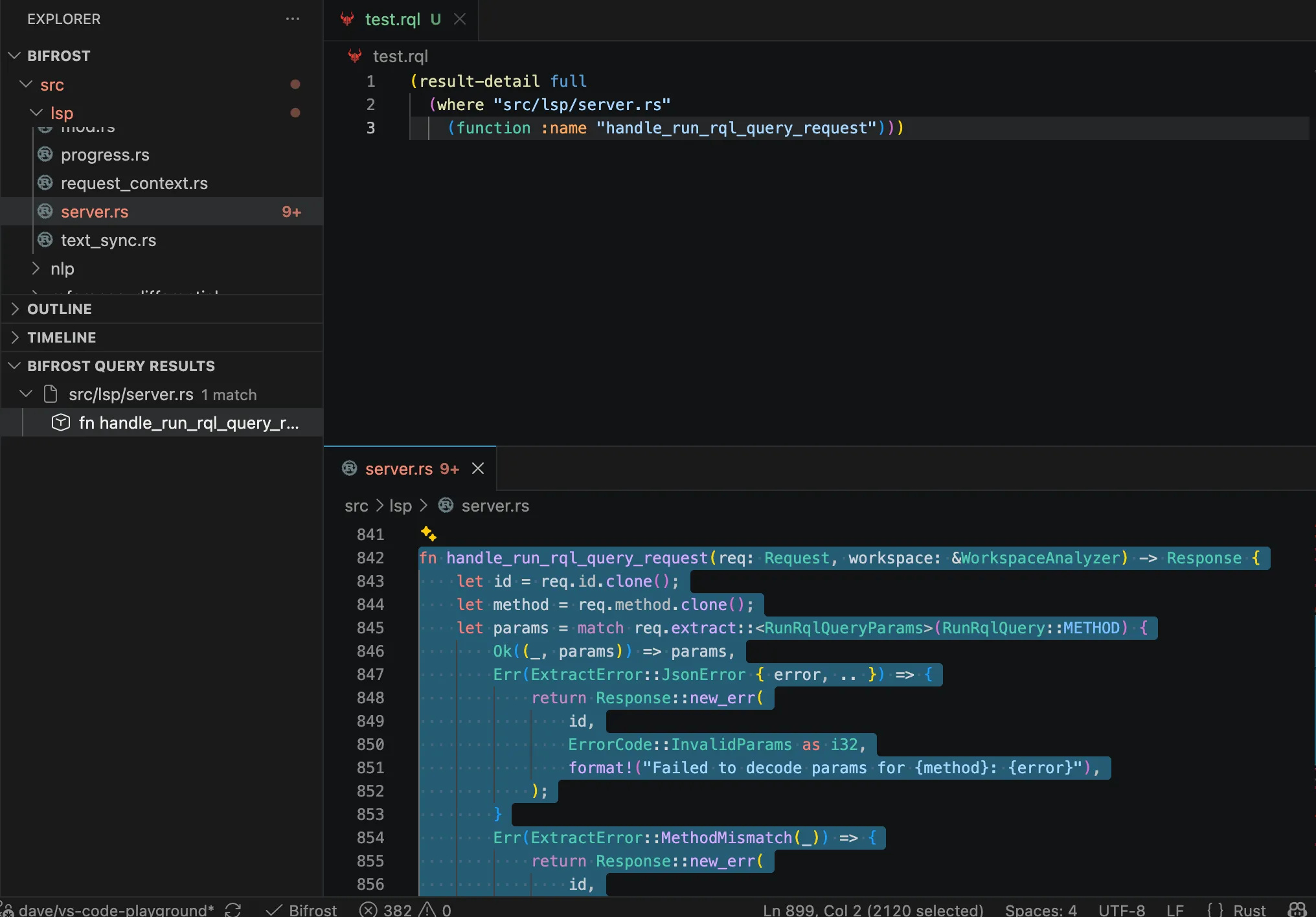
The screenshot shows a query against an older Bifrost source tree.
Query Scope
Section titled “Query Scope”The query searches every root that the running server has indexed:
- all VS Code workspace folders by default; or
- the directories in
bifrost.roots, without the paths inbifrost.exclude.
The .rql file itself can be outside the workspace. Only the code that the
query searches is limited to the indexed roots.
Results View
Section titled “Results View”Bifrost Query Results groups results by file. Select a result to open its file:
- A result with a source range opens the file and selects that range.
- A file result opens the file at its first line.
- A control edge shows both endpoint IDs and ranges.
- A typestate witness expands into its ordered steps. Each step with a source location opens that location.
The view shows each result type that query_code returns, including
structural matches, declarations, procedures, program points, control edges,
typestate and taint findings, flow endpoints, occurrences, lexical scopes,
bindings, resolution candidates, and reference edges. Pipeline forms such as
enclosing-decl, typestate, occurrences-in, binding-of, binding-uses,
candidates-of, edges-of, and file-of return the same row types, so their
results can be opened from the same view. See
CodeQuery reference for the result types and their
fields.
Labels and tooltips show the evidence that each row carries. Some rows need care when you read them:
- Typestate findings show certainty, protocol, proof and completeness status, and witness counts. They do not show a severity.
- The one lexical scope per file that has no AST node is labeled as the synthesized whole-file scope.
- A resolution candidate without a recorded precedence tier is labeled
unattributed, not as the weakest tier. - When a resolution trace is
selection_only, a missing rejection row tells you nothing. The tooltip says so. - On a reference edge, an
unknownowner relation is inconclusive, not external. Adeclaration_siterow is editor navigation, not a runtime use.
RQL Policy Documents
Section titled “RQL Policy Documents”A .rqlp file holds a (policy ...) or (endpoint ...) document. It is not an
ordinary query. Its Play button runs Bifrost: Run RQL Policy, not the query
command, and its results never go to Bifrost Query Results. The CLI
--query-file option does not accept it.
The extension highlights nested RQL only inside (rql ...). Diagnostics check
only the current text. They do not read endpoint directories, catalogs, or
files that (rql-file ...) names. The server resolves those when it runs the
policy.
To run a policy, open the .rqlp file and click Play, or run Bifrost: Run
RQL Policy from the Command Palette. The extension sends:
- the current editor text, including unsaved edits;
- the file’s URI; and
- today’s date in UTC as the evaluation date.
The extension does not name a suppression file. An (endpoint ...) document
cannot be run. A progress notification lets you cancel the run. Starting a new
run cancels the previous one.
Results appear in Bifrost Policy Results. For each policy, the view shows its completion state and its active findings. Select a finding, or a step of its display path, to open the source. Suppressed findings do not appear in the active list. They appear under Suppression audit, which also marks decisions that are expired, orphaned, policy-hash drifted, or whose result was omitted. If you edit the policy or the workspace while results are shown, the view marks them stale. Bifrost: Clear Policy Results clears the view.
The extension reads policy report schema version 5. It shows an error for any other version.
When the date or the suppression file must be fixed, run the policy from the
CLI with --evaluation-date and --suppressions-file. See
Static-Analysis Policies.
Suppress a Finding
Section titled “Suppress a Finding”Right-click a finding in Bifrost Policy Results and choose Bifrost: Suppress finding…. The command is available only for a current, active finding with a strong identity. Keep the policy file that produced the finding open.
- Choose where to write the suppression:
- Public:
.bifrost/suppressions.json, shared with the project. - Private:
.bifrost/suppressions.private.json, for decisions you do not publish. - Local:
.bifrost/suppressions.local.json, for your checkout only.
- Public:
- Enter a reason. If you leave it blank, the reason is
unspecified. Ifbifrost.requireSuppressionReasonistrue, a blank reason is an error. - The server prepares the edit. The extension creates the file and its directory if needed, applies the edit, and saves the file.
- The extension runs the policy again.
If the suppression file or a related source file changes while the server prepares the edit, the extension does not write anything. Run the command again.
Agents and MCP
Section titled “Agents and MCP”These Play actions use the editor’s language server. They do not start an MCP server, and they do not show that an agent can run a query or policy.
- For agent queries, configure a query-capable MCP toolset and pass a saved
workspace
.rqlfile toquery_codethroughquery_file. MCP does not accept unsaved editor text or inline RQL. - For agent policy runs, call the
run_policyMCP tool with workspace.rqlppaths and an evaluation date.
See MCP query and RQL availability.
For RQL syntax and the REPL, see Rune Query Language.